 Home – this menu item navigates user to the system home
page. System home page detailed description is presented in chapter 3.1 Home.
Home – this menu item navigates user to the system home
page. System home page detailed description is presented in chapter 3.1 Home.User menu is always displayed in the left-upper part of the Mauritius e-Registry system (Figure 6). Menu items Users and Admin have sub-menu lists that are expanded as you move the mouse cursor over them.
•Home – this menu item navigates user to the system home
page. System home page detailed description is presented in chapter 3.1 Home.
•Full view – click this menu to open Full view list. Full view list shows all document/deed registration records that are being registered or are already registered in the system (3.2 Full view).
•e-Registry – click this menu to open e-Registry list which contains all the documents that are registered in the system (3.3 e-Registry).
•Users – this menu contains 2 sub-menu items: “List”, which opens user list where you can create a new user and “Groups”, which opens user group list where you can administrate user security groups (the functionality that covers these menu items is described in chapter 4 User administration).
•Printouts – click this menu to open Printouts list which contains all printouts that are generated by the system (3.4 Printouts).
•Messages – click this menu item to open message list where you will be able to view or send internal system messages (3.5 Messages).
•Vouchers – click this menu to open Information services system voucher list (3.6 Vouchers). You can manage shareable vouchers in this list.
•Admin – this menu item contains all system classifiers that are grouped according to the classifier type. Put a mouse cursor over Admin menu item to expand grouped classifiers list. Move with the cursor through the grouped classifiers list – the classifiers that belong to each group will be shown as you stop on the particular group. Classifiers administration is described in chapter 5 Classifiers administration. Due to complex process, Document subtype classifier description is presented in the separate chapter (6 Instruction how to create a new document subtype ).
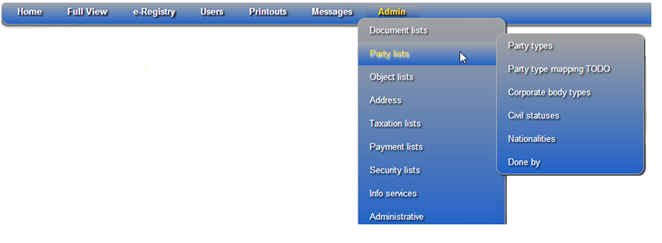
Figure 6 Main menu (Administrator)