Voucher is a paid ticket that allows a public user to perform searches in the Information services for the particular (limited) period. Voucher can be shareable or not shareable. Voucher which is not shareable can be activated only by the public Information services user and can be assigned only to the one user. Shareable voucher can be linked to multiply user accounts by administrator and can be activated only by administrator. Note that shareable vouchers can be only vouchers with type “Monthly”.
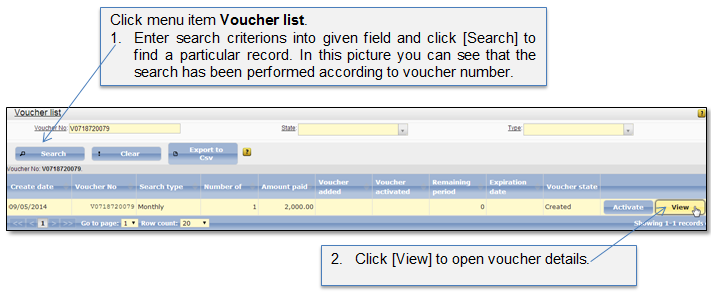
Voucher list shows all issued vouchers and their states, including voucher activation date, remaining period and expiration date. System administrator can search of a particular voucher and preview the voucher details (Figure 21 - Figure 22), add shareable voucher to user account (Add shareable voucher to user account), or activate the shareable voucher (Activate shareable voucher)
Table 5 Voucher states
|
State |
Description |
|
Created |
When public user pays for the daily or monthly searches, the voucher is created for the indicated period (days or months) with state “Created”. The voucher stays in this state until public user adds it to his voucher list. |
|
Added |
When public user adds the voucher to his account voucher list by entering issued voucher number, the voucher state turns to “Added”. The voucher becomes assigned to particular public user and is ready to be activated. |
|
Activated |
When public user initiates voucher activation, the voucher state turns to “Activated”. The public user is able to access listed searches and the voucher validity period counting is started. |
|
Expired |
When the voucher validity period expires, the access to the listed searches is closed for the public user and the voucher state turns to “Expired”. |
Figure 21 Voucher list
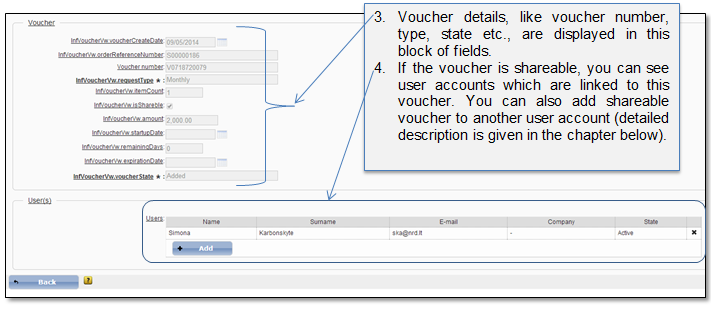
Figure 22 Voucher details