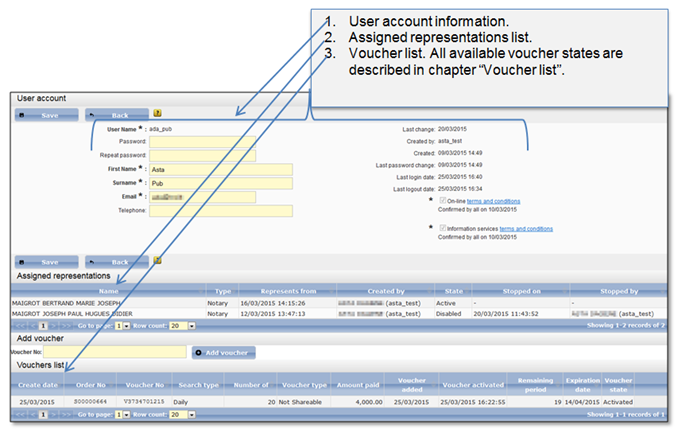
Each time the public user logins to the system, user account window is displayed to him (Figure 85). In this window user account information and user voucher list is shown.
•If there is an active voucher in the list (voucher with value “Active” in the column “Voucher state”) user can access the Information services searches from this window.
•If there’s no active voucher (no voucher with value “Active” in the column “Voucher state”), you can activate (5.2.3 How to activate a voucher) or add a new voucher to the list (5.2.2 How to add a voucher) and then proceed to the Information services searches.
•If there is at least one active or disabled assigned representation user can see it in the assigned representations list.
Also, if user has or had at least one assigned representation, the “Assigned representations” list will be shown at user account.
Figure 85 User account
Table 6 Voucher states
|
State |
Description |
|
Created |
When public user pays for the daily or monthly searches, the voucher is created for the indicated period (days or months) with state “Created”. The voucher stays in this state until public user adds it to his voucher list. |
|
Added |
When public user adds the voucher to his account voucher list by entering issued voucher number, the voucher state turns to “Added”. The voucher becomes assigned to particular public user and is ready to be activated. |
|
Activated |
When public user initiates voucher activation, the voucher state turns to “Activated”. The public user is able to access listed searches and the voucher validity period counting is started. |
|
Expired |
When the voucher validity period expires, the access to the listed searches is closed for the public user and the voucher state turns to “Expired”. |