 Note that applicant can withdraw registration until payment:
 This functionality allows the user to stop the submission entry registration by rejecting/withdrawing it (Figure 108). The submission entry withdrawal can be initiated by the officer (e.g. the applicant is suspected for the criminal activity) or by the applicant (e.g. applicant refuses to register the document/deed).
Note that applicant can withdraw registration until payment:
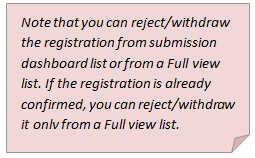
1. If you want to reject/withdraw the registration while it is in the “Submission and taxation step” (not yet confirmed) – you can perform rejection/withdrawal from submission dashboard list(or alternatively – from a Full view list).
2. If you want to reject/withdraw the registration when it is already confirmed, you can perform it only in a Full view list (3.3 Full view).
When user rejects submission entry:
•Rejection letter is generated and stored in a submission entry record Delivery tab (1.6 Delivery).
•Submission entry record is removed from submission dashboard, and the state is changed to “Rejected”.
•Submission entry record can be found and previewed in a Full view list (3.3 Full view).
•The submission officer should print and submit rejection letter for the recipient and record printout delivery to the system (1.6.1 Record delivery).
Submission entry can be rejected from Taxation, or Deed data tab.
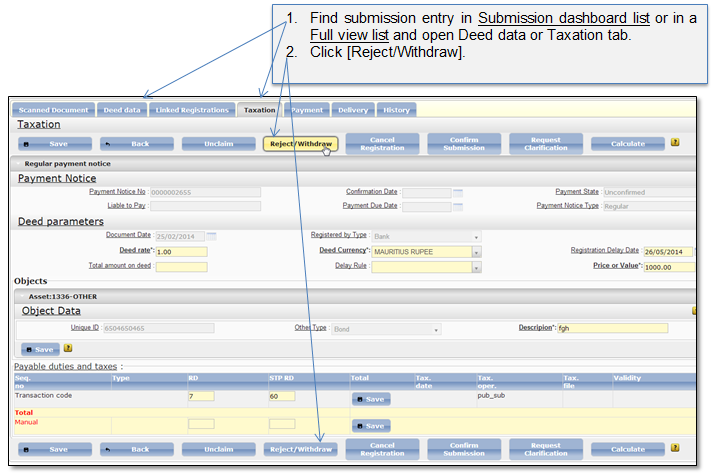
Figure 108 Reject submission entry (Taxation tab)
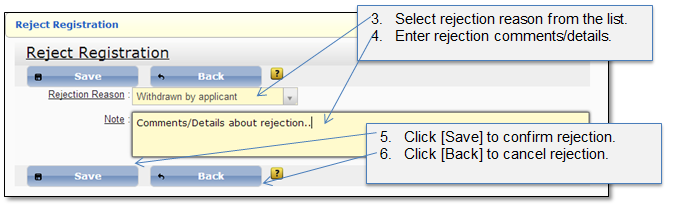
Figure 109 Registration rejection reason