Online user can submit documents and deed online. The user can create and submit online registration one by one or in batches. After the process accesses payment step, the user can pay for registration On-line.
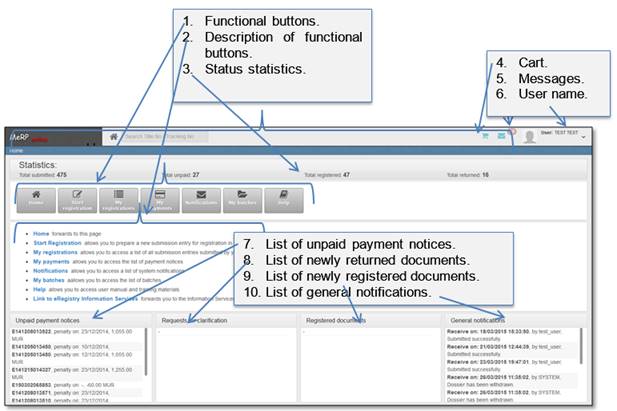
All main functions can be accessed in an On-line “Home” page:
Figure 12 Home page
In order to go back to “Home” page, click button [Back], or Home.
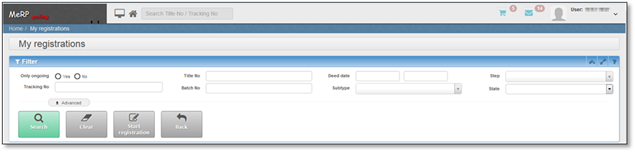
Figure 13 How to go back to “Home” page
When user clicks button [Start registration] (see 3.2 Dossier submission), new submission entry window is opened. As PDF file must be uploaded..
The submission entry window has four tabs:
•Application – in this tab deed data must be entered, and registering document must be uploaded as PDF file.
•Taxation – in this tab user can calculate preliminary taxes. Note that these calculations are not final. Final taxes will be calculated by RGD officers.
•Payment – in this tab payment notice data is displayed. Online payment buttons are accessible if payment has not been affected yet.
•Processing – in this tab information of all committed steps and all generated printouts are available.
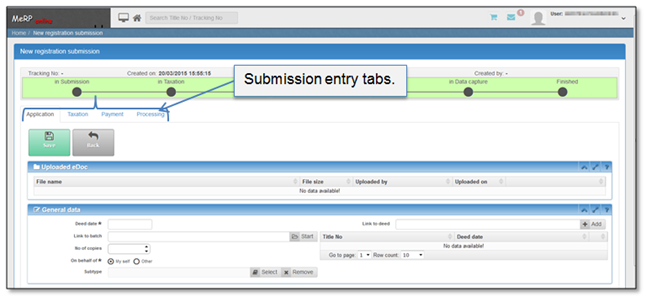
Figure 14 New registration submission window