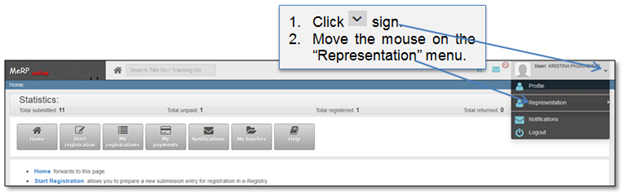
Online user can have few representations: for himself, for professional user (notary, bank/financial, surveyors, attorney, car dealers) and other (not himself and not professional user). You can change representation at the top left corner of the page (Figure 15, Figure 16).
Figure 15 Change representation (1)
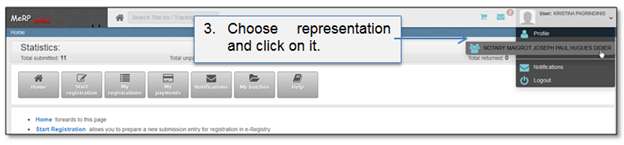
Figure 16 Change representation (2)
When user changes representation, information on different records can be found in the following lists:
•“My registrations”;
•“My payments”;
•“Notifications”;
•“My batches”
•If user represents himself, all records created and submitted on behalf of himself or “other” are displayed.
•If user represents professional organization, all record, created, submitted on behalf of that professional organization by any user who can or could represent that particular professional organization are displayed.