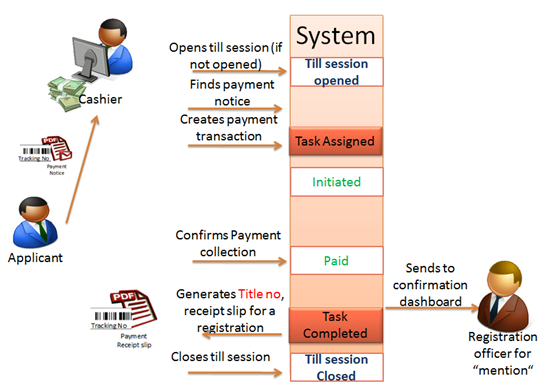
When the applicant receives the payment notice, he then proceeds to the cashier, submits the payment notice.
Cashier duties and procedure includes these steps:
•Open Till session, if it is not opened yet.
•Scan the barcode from the payment notice and find the payment record in the Payment dashboard.
•Start payment transaction.
•Add more payable items, if any.
•Select payment method and enter all necessary payment details including payable amount.
•Confirm payment, after money is collected.
When payment is successfully confirmed, the system generates separate title numbers for eDoc, annexes and copies, payment confirmation date is recorded as document registration date and registration record appears in the Confirmation dashboard.
Figure 119 Payment