 When the user confirms calculated taxation, the receipt slip and
payment notice is generated in the Delivery tab (1.6 Delivery);
When the user confirms calculated taxation, the receipt slip and
payment notice is generated in the Delivery tab (1.6 Delivery);This functionality allows the user to finish submission and taxation step:
•When the user confirms calculated taxation, the receipt slip and
payment notice is generated in the Delivery tab (1.6 Delivery);
•The registration is removed from submission dashboard list to the Payment dashboard list.
•Document/Deed data cannot be edited.
•The e-mail with attached payment notice is sent to the applicant to the e-mail address indicated in general data.
Submission entry can be confirmed from Taxation, or Deed data tab, after all object, parties, general and taxation parameters are entered and taxes or duties are calculated.
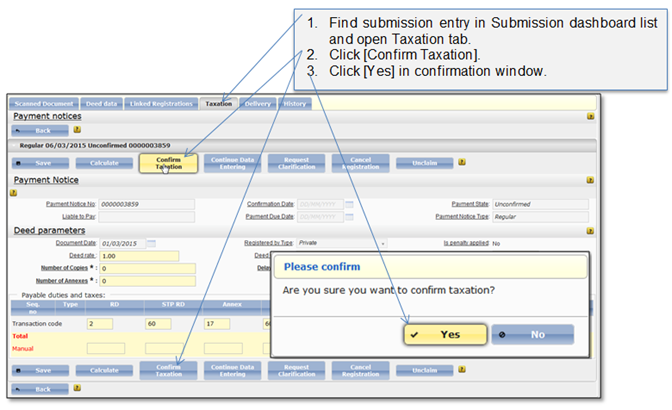
Figure 104 Confirm submission (Taxation tab)
If all entered data is correct, message that submission is completed appears. Buttons that allow to perform actions with the registration (e.g. unclaim, reject, cancel) are not shown in the window.
You can proceed registration with Payment notice and Receipt slip delivery which is described in chapter 1.6 Delivery.
! Note that taxation data cannot be edited after the record is confirmed. In case after the confirmation inaccuracies in payable amount are found (but the payment has not been submitted yet), you can create a new payment notice from the Full view list and correct the payable amount (Create new regular payment notice)