Information in the system is often displayed as a list. In this chapter general rules how to work with system lists are described. As the example, User list will be used, which has almost all general list functionality (Figure 1, Figure 2, Figure 3).
1. Rows in every list can be ordered by pressing the header of the corresponding column which is displayed in the list. When pressing first time on the column rows will be ordered in ascending order according to the selected column and by pressing second time on the column rows will be ordered in descending order according to the selected column.
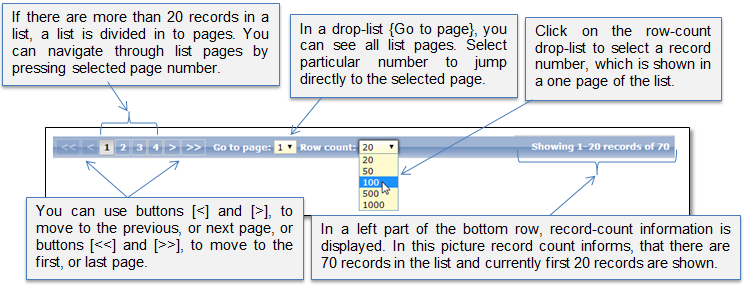
2. In a bottom row of the list (Figure 1), navigation buttons and list information is presented.
Figure 1 Bottom row of the list
3. To find a particular record, you can enter search criterions into given filter fields.
4. When search criterions are entered, click [Search] to filter the list.
5. Records that match selected criterions will be presented in the list. If there are entered several search criterions, system searches for the records that matches all of them.
6. If you want to export list to CSV file, click button [Export to CSV]. The CSV file will be automatically generated and downloaded to your computer.
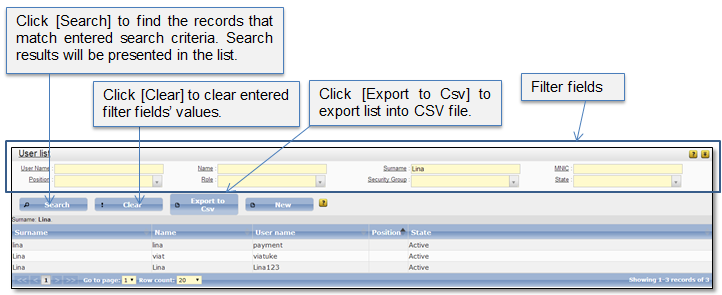
Figure 2 General list functions
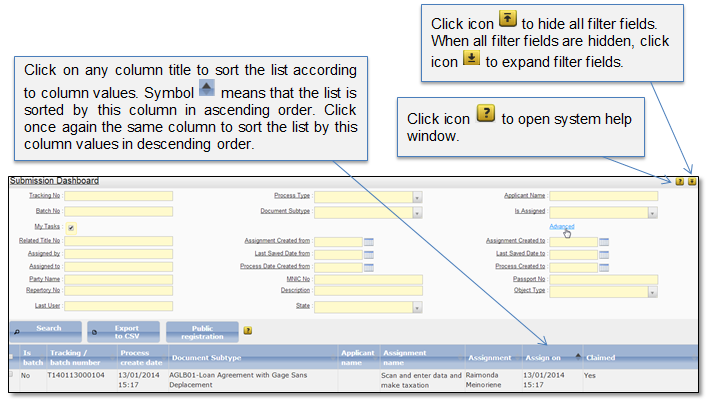
Figure 3 General list icons