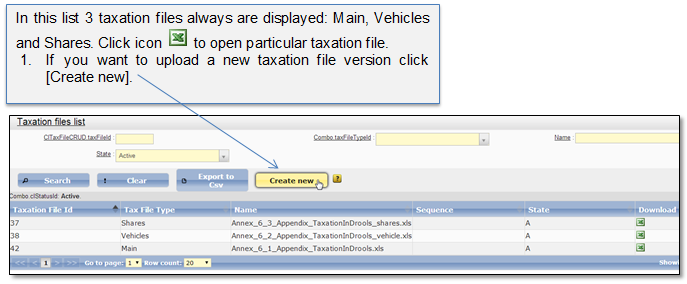
This classifier shows the list of taxation files (drools files) that are being used for automatic calculation. Select menu item “Admin → Taxation lists → Taxation files” to open the taxation files list (Figure 69). In this list system administrator can upload a new taxation file. Only the latest uploaded file versions are displayed and valid.
Figure 69 Taxation files classifier
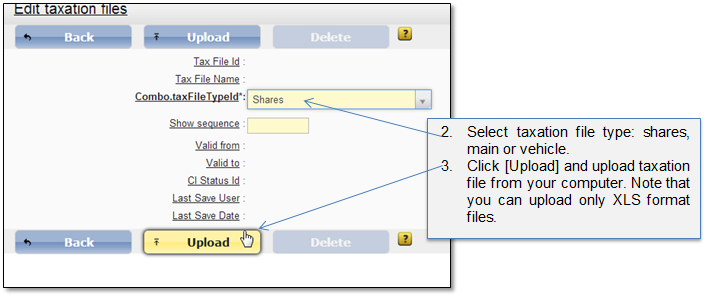
Figure 70 Upload new taxation file
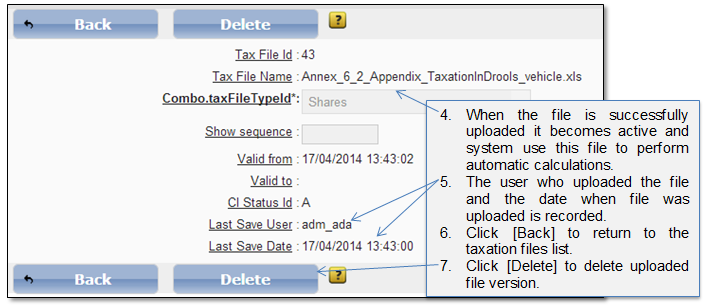
Figure 71 Uploaded taxation file
Note that to work with this classifier role “PL-10. View the taxation files list and search for the file in the list” is required.