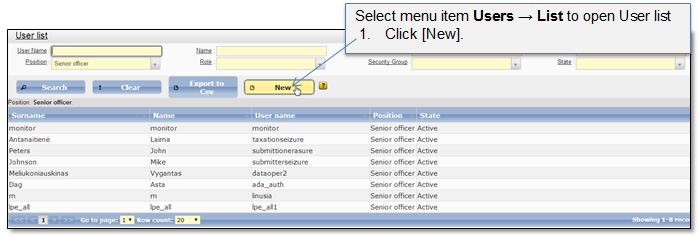
System administrator can create a new user account by the request (Figure 34 -Figure 38). When administrator enters and saves user data, the username and password will be sent to the user via email. The user state is set to "Active" and he can login to the system. The user can access the functionality in accordance with roles and security groups assigned to the user account.
Note that for user account the following constraints will be applied:
•A user ID will be minimum of 7 alphanumeric characters.
•A password will be a minimum of 8 alphanumeric characters and will not contain the person’s name or user ID.
•A password will be able to accept the following special characters! @ # $ % ?
Figure 34 Create a new user
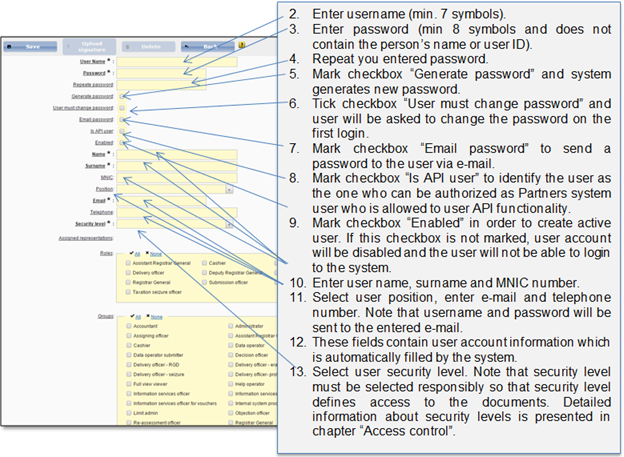
Figure 35 General user data
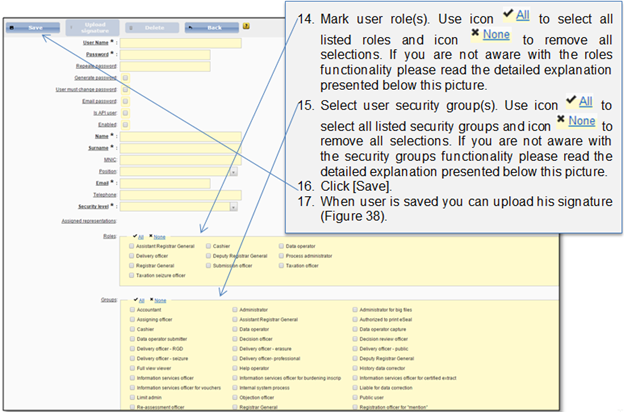
Figure 36 Selecting user roles and groups
Access to the system, processes and to the single system functionality is controlled and managed via user roles and security groups:
•Role – role describes user access to the particular registration process activity. In this context assigned role means that user will be able to perform a particular action in the system. I.e. if the Submission officer role is assigned to the user but there is no security group assigned, the user could handle the process because he/she has the required role but he/she will not be able to access the Submission dashboard, because if the security group “Submission officer – public” is not assigned. Note that roles are predefined and cannot be expanded via user interface.
•Security group – defines user access to particular functions (in other words - visibility). I.e. if security group “Submission officer - professional”, is assigned to the user, he/she will be able to access Submission dashboard and to see professional submission entry records. Note that if the role “Submission officer” is not assigned to the user at the same time, he/she will not be able to perform any actions in the dashboard, e.g. to start a new professional process, because the required role is missing (although the user can see button [Start new professional registration], because security group “Submission officer professional” is assigned). Security groups can be administered via user interface, -. administrator can create, edit or remove existing security group (4.4 User group list). If the user is assigned with the particular security group, all functions which are assigned to the particular security group are available to the user.
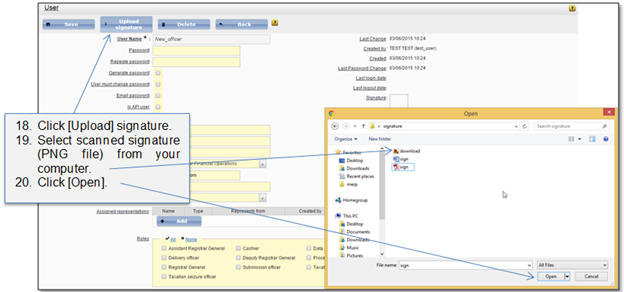
Figure 37 Upload signature
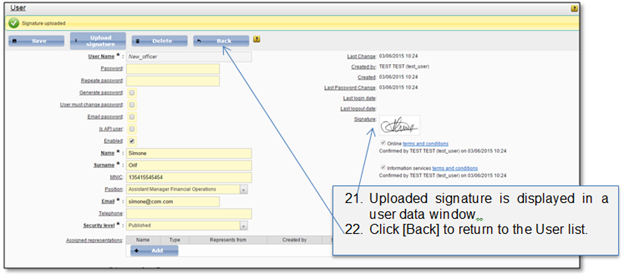
Figure 38 Uploaded signature