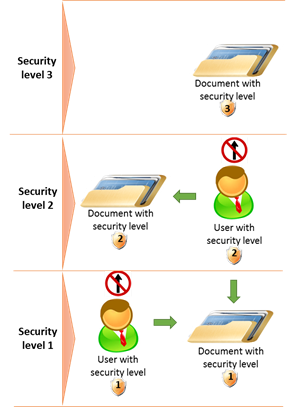
The access to the deeds/documents control is implemented via security level settings. The security level is set to:
•every subtype of document
•every user in the system
An administrator sets security level to every document subtype using classifier group "Security lists". A security level is set to the user by
•the administrator if the administrator creates an internal user of the system.
•the system if the public user is created by the applicant via request user account functionality.
! Note that the security level defines access to the document by checking the security level set to the user against the security level set to the document subtype. If the user’s security level is higher or equal to the security level set to the document subtype, the user can access the document, if lower, the user cannot.
Figure 28 Access control concept overview
The list of the security levels is managed by the system administrator and is predefined as follows.
Table 6 Security levels
|
Level |
Name |
Description |
|
0 |
Limited |
Must be used for the users that shouldn't have any access to the registered documents |
|
1 |
Published |
Must be used for documents accessible to public |
|
2 |
Limited RGD published |
Must be used for Interdict and the class above |
|
3 |
Limited published |
Must be used for ORRU13 - will list and classes above |
|
4 |
Unpublished |
Must be used to Unpublished and classes above |
|
5 |
Internal documents |
Must be used for RGD documents and classes above |
|
6 |
Unlimited |
Must be used for access to any documents and classes above |