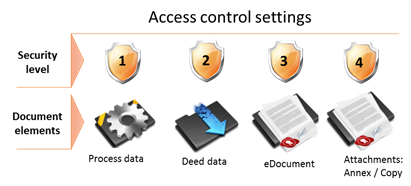
The document subtype from the access perspective is split in to elements which are as follows:
•Process data
•Deed data
•eDocument
•Attachments
Distribution document into elements allows controlling access not only to the particular document but to particular information or set of data. Therefore the security level is set to every element:
•Process data – controls access to the information on the fact that the document was registered.
•Deed data – controls access to the data entered in the “Deed data” and “Linked registrations” tabs.
•eDocument – controls access to the electronically signed pdf document, the actual registered deed.
•Attachments – controls access to other scan document type stored in the “Scanned document” tab.
The user can set different security level for every element. See, the example below.
Figure 29 Sample access control configuration
There is different security level set to every document subtype element in the picture above.
•Process data – 1st security level
•Deed data – 2nd security level
•eDocument – 3rd security level
•Attachments – 4th security level
So the access of every element requires different security level of the user.
If the user has a security level 1 he can access only element “process data” of the particular document subtype which has security level configuration described in the picture “Sample access control configuration”.
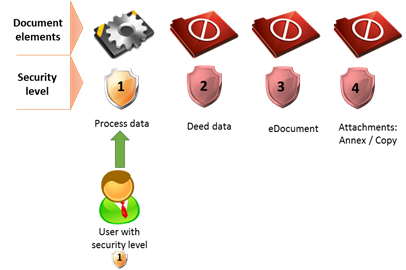
Figure 30 Access control concept overview
The user with security level 1 is able to search the document in the list and see the data shown in list columns, but he will not be able to see deed data, open eDocument file or open Annexes and copies.
If the user has a security level 2 he can access the “process data” and “deed data” of the particular document subtype which has security level configuration described in the picture “Sample access control configuration”.
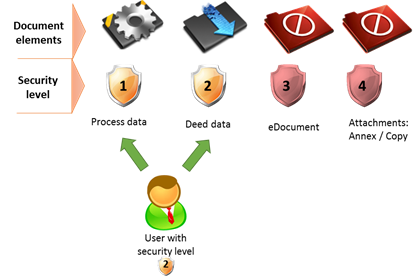
Figure 31 Access control concept overview
The user with security level 2 is able to search the document in the list and see the data shown in list columns and to open deed data element (see “Deed data” and “Related registrations” tabs) , but he will not be able to open eDocument file or open Annexes and copies.
If the user has a security level 3 he can access the “process data” and “deed data” of the particular document subtype which has security level configuration described in the picture “Sample access control configuration”.
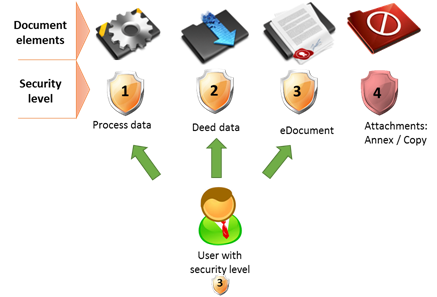
Figure 32 Access control concept overview
The user with security level 3 is able to search the document in the list and see the data shown in list columns and to open deed data element (see “Deed data” and “Related registrations” tabs) and to open eDocument file, but he will not be able to open Annexes and copies.