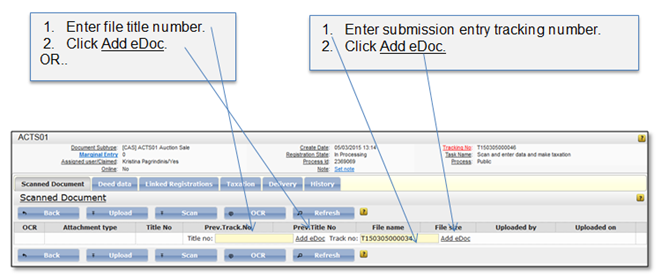
eDocument from another submission entry can be copied and added to the scanned files list. The file can be copied using title number or tracking number. If there are more than one document under entered tracking number in the scanned document list, all documents will be copied. The user can change metadata about copied file.
Figure 55 Copying eDocument to scanned document list
If submission entry with entered title or tracking number is not found, a message is displayed to the user. Check if entered number is correct or try another title/tracking number.
If submission entry with entered title or tracking number is found, the files from submission entry are automatically added to the scanned document list. Title and tracking numbers of the previous document submission entry are shown in the columns “Prev. Track No” and “Prev. Title No”.
When document is added to the list, it can be previewed or removed. Also, attachment type must be assigned to the document. These actions are described in chapter 1.1.4 Scanned document list.