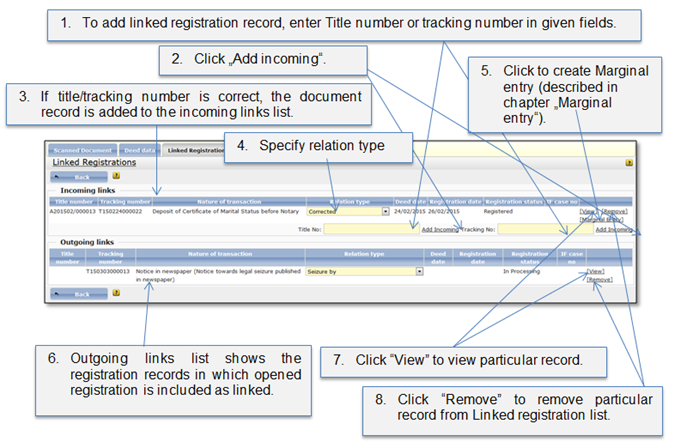
This tab shows linked registrations between documents that are stored in the system. The functionality allows the user to link document which is being registered to the already registered documents or documents which are being registered. The “Linked Registrations” tab is divided in 2 parts:
•Incoming links - for documents which are the basis for current document, e.g. like deed of ownership is incoming document for sale of property.
•Outgoing links – for documents which are follow up registrations for the registered documents, e.g. sale of property is outgoing document for the ownership deed.
If you are working with “Registration B” and in the “Linked registration” tab you add “Registration A” as an incoming link. Then, in a “Registration A” linked registration list, “Registration B” appears as an outgoing link.
Figure 81 Linked registrations list